

Excel & Data Capturing: Get Hired for Admin and Data Jobs

Learn to capture data fast and accurately, clean messy lists, use COUNTIF, SUMIF and XLOOKUP, and build pivot tables and a one-page weekly report, so you can pass the Excel tests admin employers set.
R199 once-off. Study on your phone, at your own pace. Get a certificate when you finish.
Start for R199 → Try Chapter 1 freeWe will never ask you to pay for a job. R199 pays for the course, once.
Not sure yet? Chapter 1 is free, no payment needed.
Course title: Excel & Data Capturing: Get Hired for Admin and Data Jobs
Level: Beginner to intermediate. You should know how to type and use a phone or computer. Basic Excel helps, and Chapter 1 gives you a quick refresher.
Duration: Self-paced — about 5 hours of reading, practice and quizzes across 7 chapters.
Format: Text lessons, short videos, hands-on practice activities, a quiz after every chapter, a final assessment and a certificate of completion.
What you need: A phone or computer with internet. You’ll use free Google Sheets or free Excel for the web. A computer or laptop is best for speed, but not required.
Price: R199 once-off (online)
Certificate: PurpleGrowth certificate of completion, issued automatically when you finish all chapters and the final assessment
The certificate you get when you finish
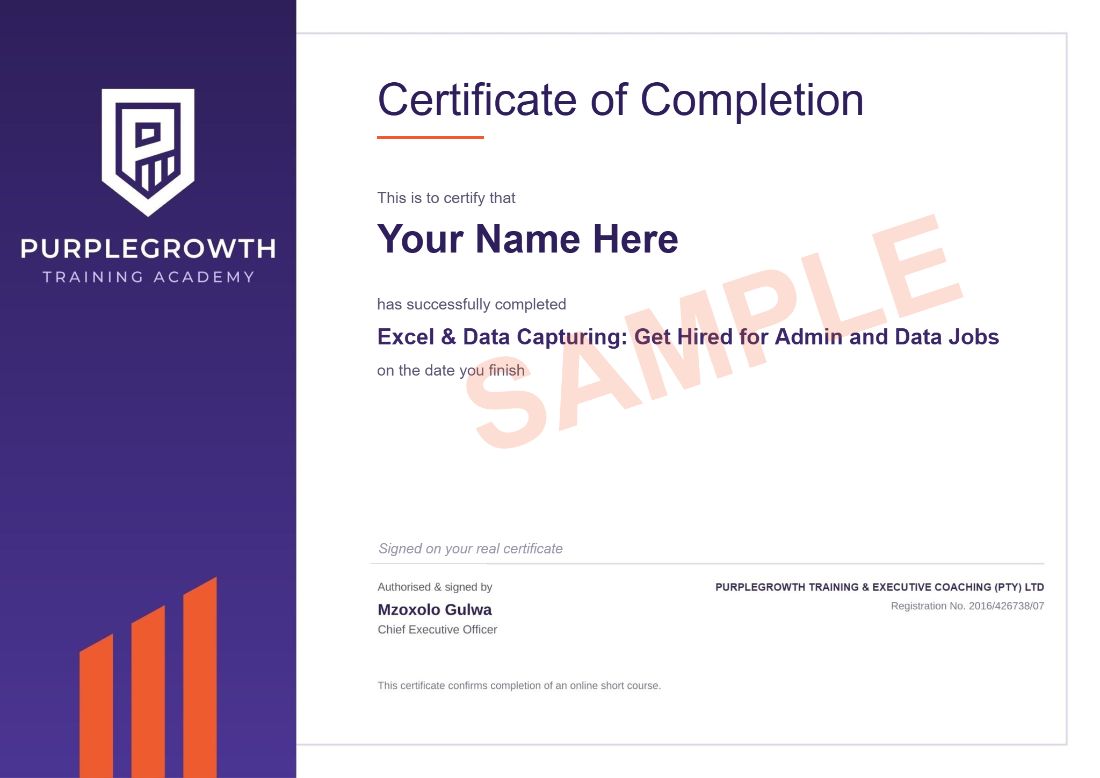
Your full name, the course name and the date you finish. Download it as a PDF as soon as you complete the course and add it to your CV.
- R199 once-off. No monthly fees and no registration fee.
- Secure payment through PayFast.
- Start straight away once your payment goes through.
- Study on your phone, at your own pace.
- 1,800+ people have signed up to Purple Growth eCampus.
What this course gets you
By the end of this course you will be able to:
Set up clean, well-structured spreadsheets and use formulas with confidence
Capture data faster and more accurately, and prevent errors with dropdown lists and validation
Clean messy data with TRIM, PROPER, Find & Replace and Remove Duplicates
Answer business questions with IF, COUNTIF, SUMIF and their multi-condition versions
Match lists with VLOOKUP and XLOOKUP, and fix lookups that fail
Build pivot tables, clear charts and a one-page weekly report
Handle personal information responsibly under POPIA, pass Excel tests and earn with your skills
Who this course is for
Job seekers applying for data capturer, admin clerk, stock controller and office assistant jobs
People already in admin or call centre roles who want to work faster and stand out
Anyone who has to pass an Excel or typing test for a job
Side hustlers who want to earn by helping small businesses with their spreadsheets
Where data capturers and admin clerks work
Data capturers work in government departments, hospitals, banks, retailers and logistics companies, and the same Excel skills are used by admin clerks, stock controllers and office assistants. You can also earn on the side by helping small businesses sort out their spreadsheets. PayScale puts the average data capturer salary at about R100,700 a year, roughly R8,400 a month, and government posts at salary level 4 can pay more (see our data capturer guide).
Will this course get you hired?
No course can promise you a job, and anyone who does is not being honest with you. What this course does: gives you the Excel skills employers test for, so you can show you can capture and check data, clean a messy list, write lookups and build a pivot table report. You finish with a practice workbook and a certificate for your CV.
After you finish
- Add it to your CV under “Courses”, for example: Excel & Data Capturing, Purple Growth eCampus (2026): accurate data capturing, data validation, data cleaning, COUNTIF/SUMIF, VLOOKUP/XLOOKUP, pivot tables and reports, POPIA basics.
- Apply for entry-level roles such as data capturer, admin clerk, stock controller and office assistant, and mention the Excel skills you can show. Never pay anyone for a job or an interview.
- Get job alerts. JobAlertsZA is a free tool that finds data capturer and admin jobs near you.
Further free resources
Free tools and sites you can use to practise, find work and keep growing after the course. All free at the time of writing.
JobAlertsZA — a free tool that finds matching jobs for you: set alerts for data capturer and admin roles — https://jobalertsza.com/
SAYouth.mobi — free, zero-rated platform for young job seekers — https://sayouth.mobi/
Google Sheets — free spreadsheets on your phone or computer — https://sheets.google.com/
Microsoft Excel for the web — free with a Microsoft account — https://www.microsoft.com/en-za/microsoft-365/free-office-online-for-the-web
Monkeytype — free typing speed and accuracy tests — https://monkeytype.com/
Information Regulator — official information about POPIA — https://inforegulator.org.za/
Want to work as a data capturer? Read our free guide: how to become a data capturer in South Africa, even with no experience. It covers pay, the skills employers test, free routes in and how to avoid work-from-home scams.
Questions people ask
Is this a scam? Will you ask me to pay for a job?
No. R199 pays for the course, once. We will never ask you to pay for a job, an interview or a placement. You pay through PayFast and the course opens as soon as your payment is confirmed.
Do employers accept this certificate?
It is a Purple Growth certificate of completion that shows you finished the Excel & Data Capturing: Get Hired for Admin and Data Jobs course and passed its assessments. It gives you proof of the skills you trained in and something concrete to put on your CV.
Do I need my own laptop or paid Excel?
No. You can use free Google Sheets or free Excel for the web on a phone or computer. A computer or laptop is faster for practice, but it is not required.
Do I need matric or experience?
No. You don’t need matric or experience to do this course. Some employers ask for matric for their jobs, so check each advert.
How long does it take?
About 5 hours of reading, practice and quizzes across 7 chapters, at your own pace, with no deadline. Your progress is saved.
What if I fail a quiz?
You need 60% to pass each chapter quiz and 70% for the final assessment, and you can retake them as many times as you need.
Can I get my money back?
Yes, within 7 days, as long as you haven’t opened any course content. See our refund policy.
Course Content
About Instructor


Course Includes
- 7 Lessons
- 35 Topics
- 8 Quizzes
- Course Certificate


Responses